Remote Desktop is a tool to control your PC computer your phone
Links to the app pages in stores:
- Android: Lite (v1.3) Full (v1.3)
- Bada OS (WVGA – 800×480): Lite (v1.2) Full (v1.2)
- Bada OS (WQVGA – 400×240): Lite (v1.2) Full (v1.2)

Main features:
- Mouse and Keyboard emulation
- IP based communication
- Multitouch support (Mouse drag’n’drop, Ctrl+C, etc)
- User-definable layouts (BRE format)
Before first use:
- Install RemoteDesktopServer on the PC (find the link below)
- Open the port TCP:8899 on the PC if any firewall is installed
- Run RemoteDesktopServer on the PC (add to autostart to have it always run)
Win32-compatible server:
Go to
www.simx.mobi/rdesktop
and click:
RemoteDesktopServerSetup130.exe
How to use:
- Install and run RemoteDesktopServer on PC machine (look the above section for details)
- If the WiFi is available: Make sure WiFi is running on the phone
- If the WiFi is not available: Ensure the port 8899/TCP is available from the Internet (redirect the port in your LAN router if needed)
- Run RemoteDesktop tool on the phone
- Set correct IP of the server
- Click Connect
- Press keyboard or mouse buttons to control your PC
General advice:
- To switch the layout: Android: Click menu, Bada: Click Camera button
- To go back to the main screen: Android: click Back button, Bada: Long press Camera button
Remote Desktop controlling:
- To move the screen: drag the finger. To single click, tap the screen
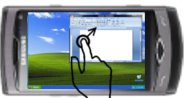
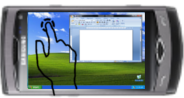
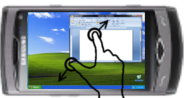
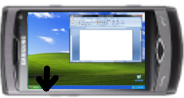
- To zoom in/out – use two-finger zooming or use side UP/DOWN buttons
- Don’t lock the screen before you connect by RemoteDesktop – the application doesn’t use the Windows RDP protocol. So it doesn’t support Windows-based authentication
Release Notes:
V1.0.1 (2011.01.11):
- key click marked by short vibration and key highlight
- user-definable layouts (Android: /sdcard/brelayout, Bada: /Others/bRemote)
- Bada: fast switching between layouts using Camera button (short click to switch the layout, long click to back to the main page)
- Settings page
V1.0.6 (2011.01.23):
- mouse wheel supported
- Full Keyboard available on Remote Desktop layouts.
V1.1 (2011.02.17):
- Customizable auto-hold of control keys (SHIFT, CTRL, ALT) and mouse buttons
- Cursor-oriented steering in remote desktop
V1.2 (2011.04.19):
- Password-based authorization
Known bugs:
- Administrator’s privilege request dialog is not displayed on the screen
when does thr new version come oit?
hi simx,
could you please make a server for remote desktop which could work on Linux preferable UBUNTU. I have to switch to Linux environment due to work requirements so i cant use the app because server is only available for windows. I was thinking to buy the software but Untill a linux server is released i have to hold back.
Thanx.
Password is not retained when you restart the computer, lost ticks to run at startup, not minimized to tray. Previous version did not have these drawbacks. Please do something, it is very good and did not regret that he had bought. Thank you.
Thank you for paying attention for these bugs. All issues will be resolved in next Server release by tonight (v1.2.1).
So where the fuck is this fucking v1.2.1 you were supposed to release nearly a month ago?
I just want to say thanks for you developed such a practical and useful app and kept renew it. Thanks a lot~
Czy wersja 1.2 będzie również dostępna na telefony z rozdzielczością 400×240? Dziś w samsungapss ukazała się owa nowa wersja w wyższej rozdzielczości, jak rozumiem wersja w niższej rozdzielczość jeszcze jest w procesie certyfikacji?
Wszystkie wersje oprocz “WQVGA Lite” powinny być od jutra dostepne w wersji 1.2.
“WQVGA Lite” przechodzi jeszcze proces certyfikacji i będzie dostępna za tydzien
Dzięki za odpowiedź.
Wersja Lite mnie nie za bardzo interesuje, gdyż wykupiłem pełną wersję programu 🙂
Moje słowa uznania za stworzenie jednej z najlepszych aplikacji dostępnych w samsungapps.
Very good app! Please can you provide a function of audio redirect from pc to phone?
I’ve added the feature to the wish-list
na samsung 723 nie ma podglądu pulpitu, działa tylko wskaźnik myszy (jak ruszam po ekranie telefonu to wskaźnik na monitorze się przesuwa), proszę o info czy jest szansa na poprawe sytuacji czy trzeba zmienić telefon??
Jaką wersję aplikacji używasz? Na jakim layoucie jest ten objaw? “Remote Desktop” ?
When i try buy RemoteDesktop in SamsungApps site with my S8500 cellphone show error in credit card, but numbers and data are right. How i can buy this software for my BADA smartphone? Can you help me?
Sorry, i don´t speak English.
I’m not responsible for SamsungApps support. Write the question to Samsung by SamsungApps page, please.
Does it work on Windows 7?
Yes, I’ve tested both 32 and 64-bit versions of Windows 7
Hey,
Friends I have dowloaded this app and tried to access, but it is not working for me I have open the port:8899 iajn my pc and followed the steps given.
Can anyone plz help to sort this.
Thanks in Advance,
Raj.